Helping people in a large org understand what a design system is is still one of the key challenges behind adoption. That’s why we built the NYS Design System Playground. Think of it like Google Slides meets CodePen. Anyone can jump into a CodePen like experience and start playing around with code, only it has the New York State Design System components, tokens, and utilities installed by default. People can see the code, make changes, and watch the results update in realtime.
If I’m being honest… as I said before, a big part of design system adoption is education and awareness. Our team is often putting together presentations for videos, workshops, or office hours that help explain design system concepts to folks, so we built this as a first-class presentation tool.
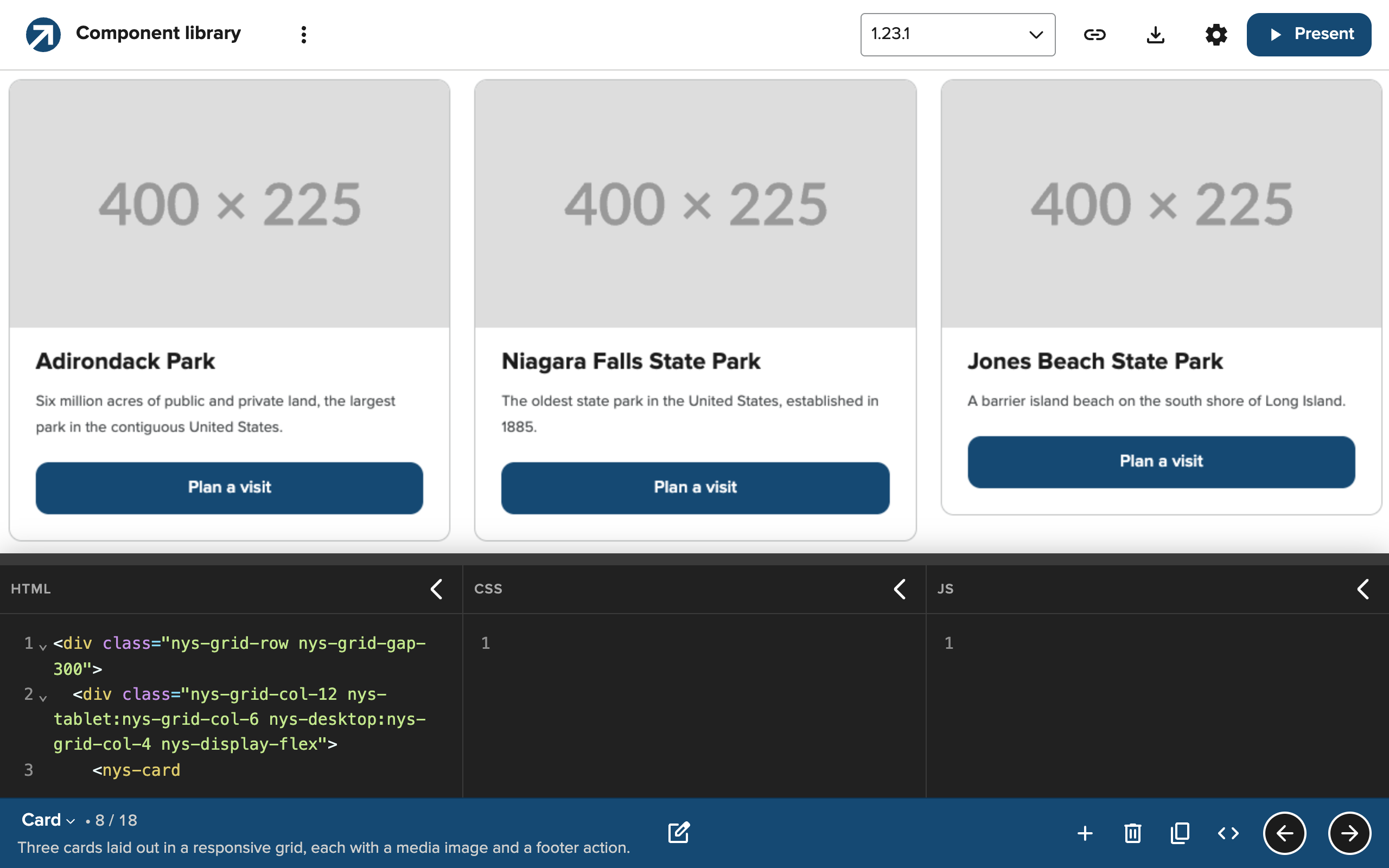
You build a deck of slides, where each slide is a live editor on the bottom (HTML, CSS, and JavaScript) and a rendered preview on top (the “slide”). The CodePen part should feel familiar, and the Google Slides part is there because it makes presenting easy. When I record a walkthrough for another team or post a demo on LinkedIn, I love having the code and the result on screen together and being able to drive the whole thing from the keyboard.
We created it for our internal teams, but since it’s open source, I wanted to share more broadly for others to try!
Starter packs
The Playground ships with a few starter decks.
The Component library deck has a slide for every part of the design system. Open the card slide and you can edit our nys-code examples and see the results right away. Change the heading and the preview updates as you type. It’s a more interactive version of our NYS Design System reference site.
The Customizing components deck walks through the different ways a design system can handle customization: locked down components, configurable, or write guidance and pray. But it goes on to explain how we handle customization with the NYS Design System.
We built our component library with web components, which are encapsulated and prevent most CSS from leaking through. That means a component like our nys-globalheader is locked down and can only be modified using the API we’ve designed for it: application name, agency name, links, etc. — but not its styles.
But some of our components are designed to be a bit more flexible. What if your team needs a red button? We don’t ship one, but we do support some CSS overrides for the nys-button that lets you extend the buttons in a predefined way. That’s the whole agreement between a design system and the downstream teams using it, demonstrated in one slide.
Teams get a sanctioned way to change something, and the system keeps evolving underneath them without breaking it. It’s a complicated concept we explain in our documentation, but the concept makes a lot more sense when people watch it happen.
Version access
Another key feature of the Playground is the ability to load specific release versions. A version picker in the toolbar switches the design system underneath whatever you’re working on.
Go to the card slide and pick a release from before the card component existed. The cards disappear. You’re left with the buttons and images that used to live inside them. It may seem like a small thing, but it makes the design system’s history visible and makes debugging easier because teams can quickly test on any version (including pre-releases!)
Don’t forget to play
The starter decks are good, but playgrounds are for playing!
- Create new slides with titles, groups, presenter notes, and editor defaults.
- Edit decks to rearrange slides or apply global CSS applied to every slide.
- Present full screen and use the arrow keys to move between slides,
cto toggle the code editors, andnto show your presenter notes. - Customize a dark or light editor, side-by-side or tabbed editors, and live/manual preview updates, etc.
One thing to understand… for this early version, decks live in your browser’s local storage, not on a server. But we’ve made it easy to share decks with a link or export decks as JSON.
And we’re drinking our own champagne here… the source is on GitHub. If you dig into it, you’ll notice we built the playground itself with NYSDS components. Where the design system didn’t have what we needed (e.g. a code editor), we built it using our tokens.
Beyond the browser
Everything I’ve described so far is about the Playground in a browser. But we also publish an npm package with a command-line tool, and that’s where some of the most interesting and useful workflows can happen.
The CLI supports version selecting, so it can open the playground with local files already loaded into the editors, or print a shareable link to them without needing to start a server. Both take a --version flag.
Here are a few ways I’m using the CLI:
Reproduce a bug on a specific version
Let’s say somebody reports a bug to our internal NYSDS troubleshooting channel. I can pass in the code and version they’re using:
npx @nysds/playground --html their-snippet.html --version 1.21.0Their code lands in the Playground’s scratch pad, on their version. It’s a great way to quickly check reproductions. If it’s truly broken, I can just switch the version picker to the latest release and see whether we’ve already fixed it.
Supercharged bug reporting
We can take this one step further.
Our team keeps a small workspace for filing design system bugs with Gemini CLI, a coding agent we officially have access to. The workspace connects Gemini to the NYSDS MCP server, Chrome DevTools, GitHub, and the Playground CLI, along with a shared set of instructions for what a good bug report looks like.
And with a skill, you can describe the problem in a sentence:
/file-bug In the datepicker calendar popup, Tab goes to the Today and Clear buttons before the month controls.
Gemini reads the component’s source, reproduces the defect in a browser, creates a minimal reproduction, then uses the Playground CLI to turn that reproduction into a link, pinned to the version it tested against:
nysds-playground link --html repros/nys-datepicker.html --version 1.21.0 \
  --base https://its-hcd.github.io/nysds-playground/
It makes quick work of sense-making, and every issue filed can be accompanied with a live reproduction. Whoever picks up the issue doesn’t have to rebuild the bug from a paragraph of steps.
They click the link and see it.
Let the agent check its own work
The CLI can work in the other direction, too.
When Gemini writes NYSDS markup, e.g. to test out a new interaction, it can save the snippet and open it in the playground to share with other teams:
npx @nysds/playground --html form.htmlNow you’re both looking at real components in a browser, not a guess at what the markup will do.
If you have feedback about the NYSDS Playground, I’d love to hear it!